Phone Security
Protect your smartphone and mobile data from threats and unauthorized access
Mobile Device Security
Your phone contains sensitive information - keep it secure with these essential practices
Lock & Authentication
Secure Access:
- Enable screen lock (PIN, pattern, or password)
- Use biometrics (Fingerprint, Face ID)
- Set auto-lock to 30 seconds or less
- Enable "Find My Device" features
- Set a SIM card lock/PIN
App Security
Safe App Practices:
- Use only official stores (App Store/Google Play)
- Review app permissions carefully
- Keep all apps updated regularly
- Uninstall apps you no longer use
Warning: Avoid "sideloading" apps from unknown websites; these are high-risk for malware.
Network & Connectivity
Secure Connections:
- Disable auto-connect to public Wi-Fi
- Use a VPN on any public network
- Turn off Bluetooth when not in use
- Use mobile data for banking/sensitive tasks
Data & Backup
Protect Your Data:
- Enable full device encryption
- Use secure, encrypted cloud backups
- Enable 2FA on your Apple/Google accounts
- Use encrypted messaging (Signal, WhatsApp)
Advanced Security & Recovery
If Your Phone is Stolen:
- Remotely lock or wipe using "Find My"
- Contact carrier to suspend the SIM
- Change all account passwords immediately
- Use Stolen Device Protection (FaceID needed for password changes)
Proactive Setup:
- Keep a paper copy of your passport/ID
- Set a password change delay (Security Delay)
- Keep recovery codes in a physical safe
- Set a separate PIN for your cellular account
Security Architecture: The Two-Device Setup
How to isolate your critical data from daily risks
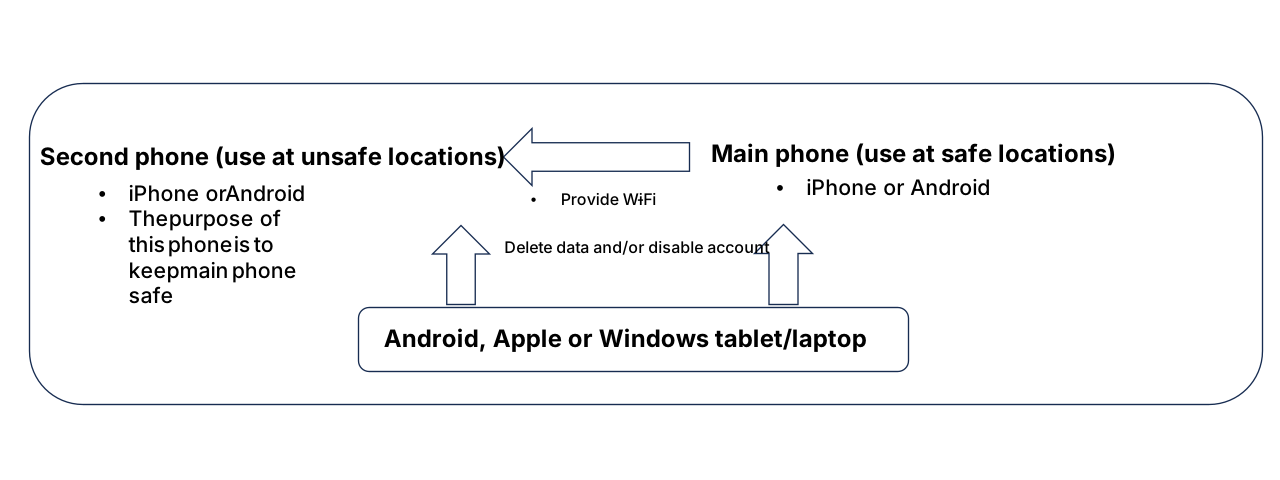
Overview Setup
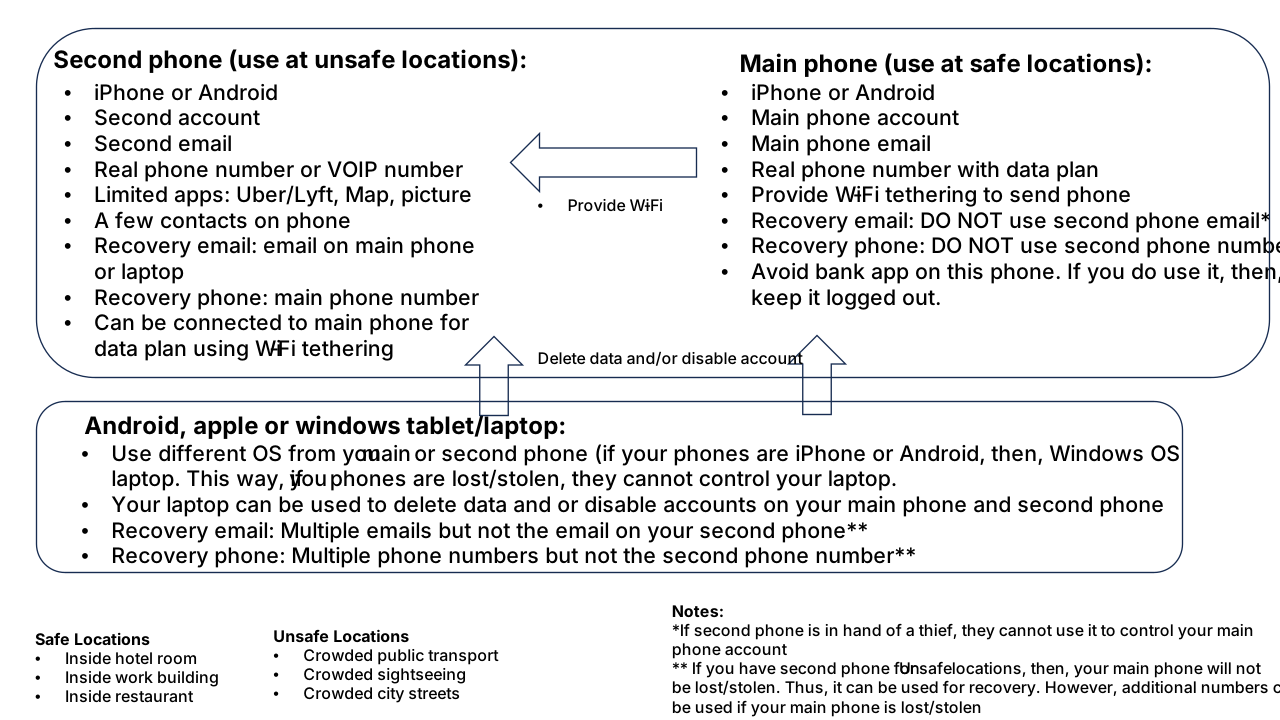
Technical Details
Why use this setup?
- Isolation: Loss of a "travel" or second phone doesn't expose your main life.
- Control: Your main device can remote-wipe the secondary one, but not vice-versa.
- Redundancy: Keeping devices in separate locations prevents a single event from locking you out of everything.
Deep Dive: Want more technical details? Visit our Deep Dive page for product-specific settings.
References & Sources
Cybersecurity and Infrastructure Security Agency (CISA) - "Mobile Device Security."
cisa.gov/secure-our-world
CISA - "Traveling with Mobile Devices."
cisa.gov/secure-our-world
Federal Communications Commission (FCC) - "search for Wireless Device Security."
fcc.gov/consumers/guides/wireless-device-security
Federal Trade Commission (FTC) - "Search for Mobile Device Security."
consumer.ftc.gov/articles/mobile-device-security
FBI Internet Crime Complaint Center (IC3) - "Search for Mobile Device Threats."
ic3.gov/Home/MobileDeviceThreats
National Institute of Standards and Technology (NIST) - "Mobile Device Security."
nccoe.nist.gov/projects/building-blocks/mobile-device-security
For educational purposes. Verify with official government or security providers.